Role hints
Give an entity the Home Assistant label flightday_<role>, such as flightday_wake_lights, and it becomes a strong suggestion for that role. A person still confirms it; nothing is applied silently.


Integrations
The alarm clock is the core. Everything else is an integration that lights up when you have the device: a speaker, lights, a thermostat, a vacuum, cameras, AI. Missing one is never a problem.
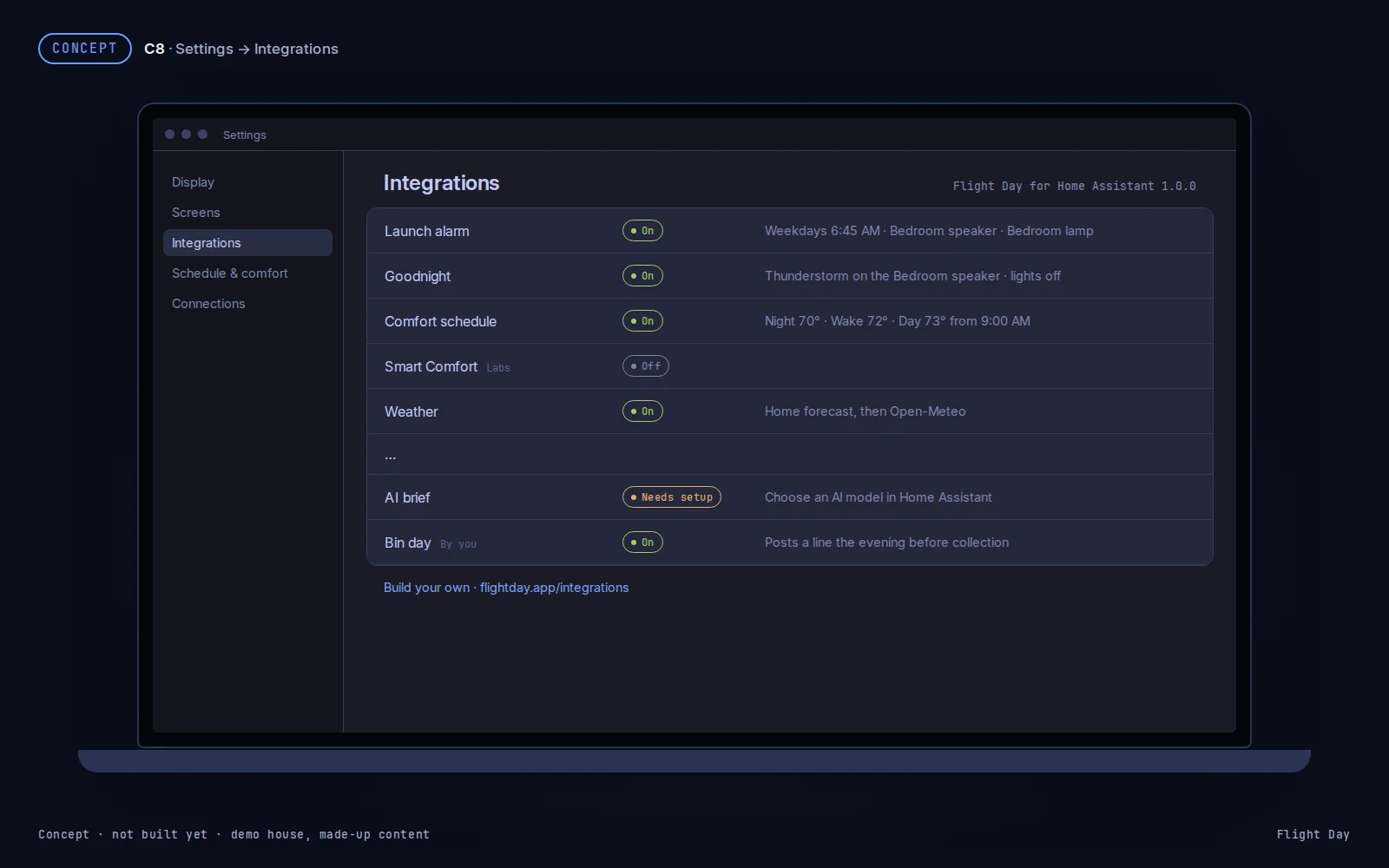
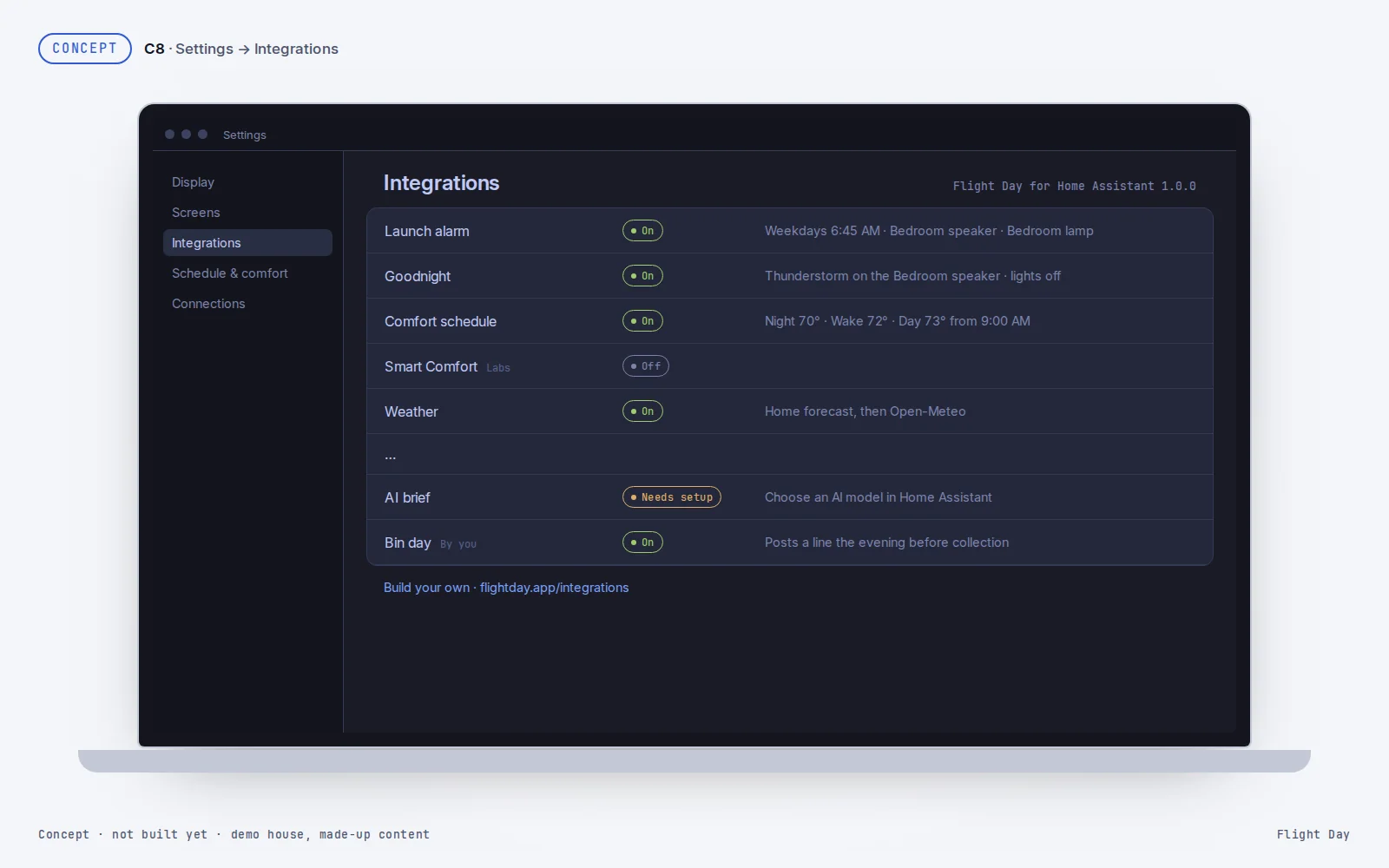
Where this stands. The integrations below run in one household today, each with its status. The public extension API and Settings › Integrations arrive with Flight Day for Home Assistant at the open-source release on 8 Dec. In development
Core parts need no devices. The rest use roles: the devices you point Flight Day at, such as your bedroom speaker or wake lights. The status is today’s: Live In development Concept
| Integration | What it does | Uses | Status |
|---|---|---|---|
| Launch alarm | Countdown, liftoff, Snooze, I’m up, Scrub and the briefing. Sound on the screens and a dawn on screen by default; a speaker’s volume ramp and a light ramp when you have them. | sleep_speaker · alarm_speaker · wake_lights · ring_lights (all optional) | CoreLive |
| Goodnight | Dark screens, and the sleep sound on the device by default; a speaker’s sound and lights off when you have them. | sleep_speaker · goodnight_off (optional) | CoreLive |
| Weather | The forecast, rain soon and alerts. Open-Meteo is built in, free, with no key; Home Assistant weather sources join it. | weather (optional) | CoreLive |
| Space | Launch manifest, globe, ISS passes, visible launches and Flight Director, from public feeds. On by default, no setup. | — | Live |
| Comfort schedule | Night, Wake and Day temperatures. Keeps the mode; Off stays off. | thermostat | Live |
| Smart Comfort | Automatic heat and cool, fresh air and holds. Starts by watching only. | thermostat · weather · indoor_temperature | In development |
| Room readings | Temperature and humidity per room. | indoor_temperature | In development |
| Cameras | Camera stills and tap-to-view. | cameras | Live |
| Robot vacuum | Status, start, pause, dock and the map. Room cleaning through adapters. | vacuum · vacuum_map | Live |
| Countdowns | “title in N days”. | — | CoreIn development |
| House check | What needs attention, from checks, with an optional AI summary. | ai (optional) | In development |
| AI brief | One AI-made line in the briefing, labelled AI-made. | ai | Live |
| Flight Plan | An AI-made plan for the day from the calendar and routines. | ai | Concept |
| Builder desk | AI plan limits, agents and machines, from a hub with the usage collector. | (hub) | Live |
| Continue training | Continue training (optional): opens the Morrowdock app's Today screen. Needs the Morrowdock iPad app (private beta). | — | In development |
Each integration gets a status and a one-line summary. Green is on, muted is off, amber needs you, red is an error.
| Status | When | Example |
|---|---|---|
| On | Turned on, with every device it needs present and working | “Weekdays 6:45 AM · Bedroom speaker · Bedroom lamp” |
| Off | Turned off | “Labs · automatic heat and cool, shadow first” |
| Needs setup | On, or about to be, but a device it needs is missing | “Choose a thermostat” |
| Unavailable | A device it uses is unavailable | “Bedroom speaker unavailable · volume control off” |
| Error | Its own code failed; Home Assistant gets a repair notice | “Stopped after an error · see Home Assistant” |
Your own integrations show On or Off, and Unavailable when they haven’t posted for longer than they promised (“No update since 6:10 AM”).
Four small parts of Flight Day for Home Assistant, usable from automations, scripts or a custom integration, with no Flight Day code changes. In development
Give an entity the Home Assistant label flightday_<role>, such as flightday_wake_lights, and it becomes a strong suggestion for that role. A person still confirms it; nothing is applied silently.
Post a short line to the briefing, Home or Night with flightday.post_line: up to 80 characters, with an end time. Night lines are text only; they never wake a screen or make a sound.
Report something that needs attention to the house check with flightday.report_check, optionally with a one-tap fix. Locks, alarm panels and thermostats can’t be fixes.
Register with flightday.register_integration when the flightday event says ready, and react to that event in automations: wake is liftoff, up is a confirmed “I’m up”.
Each example runs against Flight Day for Home Assistant (contract 3.0, Home Assistant 2026.1 or later). They publish with the source on 8 Dec. None has passed staging validation yet; each says so until it does.
Registers, then posts a line the evening before collection and clears it the next morning. A shorter variant is included; install only one.
# Append both entries to automations.yaml. Collection sensor: local YYYY-MM-DD.
- alias: Bin day register
  triggers:
    - trigger: event
      event_type: flightday
      event_data: {action: ready}
  actions:
    - action: flightday.register_integration
      data: {id: bin_day, name: Bin day, provides: [lines]}

- alias: Bin day line
  triggers:
    - trigger: time
      at: "17:00:00"
      id: evening
    - trigger: time
      at: "09:00:00"
      id: morning
  actions:
    - if:
        - condition: template
          value_template: "{{ trigger.id == 'evening' and states('sensor.bin_collection_day') == (now().date() + timedelta(days=1)) | string }}"
      then:
        - action: flightday.post_line
          data:
            source: x_bin_day
            key: recycling
            text: Recycling goes out tonight
            show: [briefing, home]
            priority: normal
            until: "{{ (today_at('09:00') + timedelta(days=1)).isoformat() }}"
            icon: recycle
      else:
        - action: flightday.clear_line
data: {source: x_bin_day, key: recycling}- alias: Bin day minimal register
triggers: [{trigger: event, event_type: flightday, event_data: {action: ready}}]
actions:
- action: flightday.register_integration
data: {id: bin_day, name: Bin day, provides: [lines]}
- alias: Bin day minimal line
triggers: [{trigger: time, at: "17:00:00"}]
conditions:
- condition: template
value_template: "{{ states('sensor.bin_collection_day') == (now().date() + timedelta(days=1)) | string }}"
actions:
- action: flightday.post_line
data: {source: x_bin_day, key: recycling, text: Recycling goes out tonight,
show: [briefing, home], priority: normal,
until: "{{ (today_at('09:00') + timedelta(days=1)).isoformat() }}"}A house check that turns from attention to ok, with no action.
- alias: Filter reminder
  mode: restart
  triggers:
    - trigger: event
      event_type: flightday
      event_data: {action: ready}
  actions:
    - action: flightday.register_integration
      data: {id: filter_reminder, name: Filter reminder, provides: [checks]}
    - repeat:
        while: "{{ true }}"
        sequence:
          - if:
              - condition: template
                value_template: "{{ is_number(states('sensor.robot_vacuum_filter_days_remaining')) }}"
            then:
              - action: flightday.report_check
                data:
                  source: x_filter_reminder
                  key: filter_due
                  status: "{{ 'attention' if states('sensor.robot_vacuum_filter_days_remaining') | float <= 3 else 'ok' }}"
                  title: Robot vacuum filter
                  detail: "{{ 'Replace now' if states('sensor.robot_vacuum_filter_days_remaining') | float <= 0 else 'Replace in ' ~ (states('sensor.robot_vacuum_filter_days_remaining') | float | round(1)) ~ ' days' }}"
                  since: "{{ states.sensor.robot_vacuum_filter_days_remaining.last_changed.isoformat() }}"
                  morning: false
            else:
              - action: flightday.clear_check
                data: {source: x_filter_reminder, key: filter_due}
          - wait_for_trigger:
              - trigger: state
entity_id: sensor.robot_vacuum_filter_days_remainingA house check with a one-tap Turn off action.
- alias: Porch lights check
  mode: restart
  triggers:
    - trigger: event
      event_type: flightday
      event_data: {action: ready}
  actions:
    - action: flightday.register_integration
      data: {id: porch_lights_check, name: Porch lights check, provides: [checks]}
    - repeat:
        while: "{{ true }}"
        sequence:
          - if:
              - condition: template
                value_template: "{{ states('switch.porch_string_lights') in ['on', 'off'] }}"
            then:
              - action: flightday.report_check
                data:
                  source: x_porch_lights_check
                  key: porch_lights_late
                  status: "{{ 'attention' if is_state('switch.porch_string_lights', 'on') else 'ok' }}"
                  title: Porch string lights are on
                  since: "{{ states.switch.porch_string_lights.last_changed.isoformat() }}"
                  morning: false
                  action:
                    label: Turn off
                    domain: switch
                    service: turn_off
                    target: {entity_id: switch.porch_string_lights}
            else:
              - action: flightday.clear_check
                data: {source: x_porch_lights_check, key: porch_lights_late}
          - wait_for_trigger:
              - trigger: state
entity_id: switch.porch_string_lightsReacts to a confirmed “I’m up”, leaving out tests and timeouts.
- alias: Coffee when up
  triggers:
    - trigger: event
      event_type: flightday
      event_data: {v: 3, action: up, test: false}
  conditions:
    - condition: template
      value_template: "{{ not trigger.event.data.test and trigger.event.data.by != 'timeout' }}"
    - condition: time
      after: "05:00:00"
      before: "12:00:00"
    - condition: state
      entity_id: switch.coffee_maker
      state: "off"
  actions:
    - action: switch.turn_on
target: {entity_id: switch.coffee_maker}A role hint through a Home Assistant label.
# Label a wake light

validated on staging: pending

1. In staging HA, open Settings → Devices & services → Entities.
2. Open the demo Bedroom lamp (`light.bedroom_lamp`), then its entity settings.
3. In Labels choose Add new label. Name it `flightday_wake_lights` and confirm
   the generated label id is exactly `flightday_wake_lights`. Save it on the
   entity, rather than only on its device or area.
4. Open Flight Day's Rooms & devices editor and request suggestions again.
   An eligible light carrying that label receives +100 suggestion weight.
   Confirm the suggested wake-light role yourself; a label applies nothing
   silently. The wake_lights list includes eligible labelled entities.
5. Remove the entity label to undo the hint; edit any already-confirmed role
   separately. Changing a hint does not erase a person's saved choice.

screenshot to come (demo house)

No screenshots of real houses. UI labels can vary by HA version; confirm these
steps on staging. Labeling alone never turns the lamp on.

Service-data schema validation: N/A; no registration or service call.A small custom Home Assistant integration that registers itself and posts one line from a sensor it creates.
{
  "domain": "flightday_example",
  "name": "Flight Day example",
  "version": "1.0.0",
  "documentation": "https://flightday.app/integrations",
  "dependencies": [
    "flightday",
    "sensor"
  ],
  "codeowners": [],
  "iot_class": "local_push",
  "integration_type": "helper"
}"""YAML-only example; its sensor platform owns the entity lifecycle."""
from homeassistant.helpers import config_validation as cv, discovery
DOMAIN = "flightday_example"
CONFIG_SCHEMA = cv.empty_config_schema(DOMAIN)
async def async_setup(hass, config):
"""Load the sensor without a config entry or config flow."""
await discovery.async_load_platform(hass, "sensor", DOMAIN, {}, config)
return True"""Measure the automation count when Flight Day reports ready."""
from datetime import timedelta
from homeassistant.components.sensor import SensorEntity
from homeassistant.util import dt as dt_util
async def async_setup_platform(hass, config, async_add_entities, discovery_info=None):
async_add_entities([AutomationCount()])
class AutomationCount(SensorEntity):
_attr_name = "Flight Day example automation count"
_attr_unique_id = "flightday_example_automation_count"
_attr_should_poll = False
async def async_added_to_hass(self):
await super().async_added_to_hass()
self.async_on_remove(self.hass.bus.async_listen("flightday", self._publish))
async def _publish(self, event):
if event.data.get("action") != "ready":
return
hass = self.hass
self._attr_native_value = len(hass.states.async_entity_ids("automation"))
self.async_write_ha_state()
await hass.services.async_call("flightday", "register_integration", {
"id": "example_sensor", "name": "Automation count", "provides": ["lines"]
}, blocking=True)
await hass.services.async_call("flightday", "post_line", {
"source": "x_example_sensor", "key": "automation_count",
"text": f"{self.native_value} automations at Flight Day ready",
"show": ["home"], "priority": "normal",
"until": (dt_util.now() + timedelta(hours=24)).isoformat()
}, blocking=True)Community integrations are listed here when they follow the rules above, have a public repository and docs, and are submitted by pull request to the site with a one-line description and a Real or Sample screenshot.
Being listed never means Flight Day runs that code. People install it themselves.